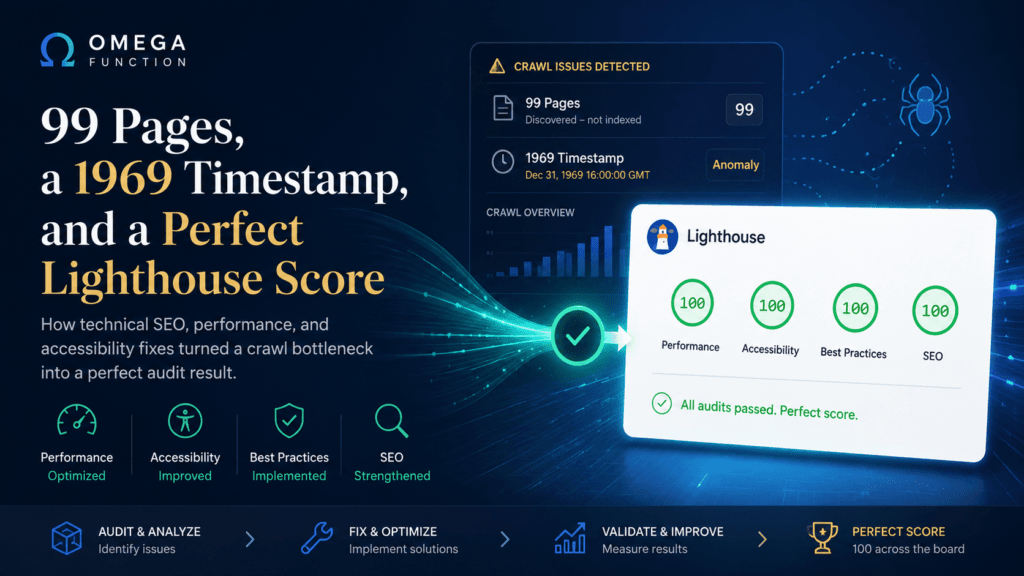
When Google Search Console shows a crawl date of December 31, 1969, you are looking at Unix epoch zero. That is the timestamp a system returns when it has no timestamp at all. For a site we were brought in to audit, that date appeared next to 99 pages in the Discovered, Currently Not Indexed bucket. Every single one. Never crawled.
This is the story of what caused it, how we resolved it, and what happened when we ran the final Lighthouse audit afterward.
What “Discovered, Currently Not Indexed” Actually Means
This status is widely misread. It does not mean a penalty. It does not mean thin content or a manual action. It means Googlebot found the URL, added it to a queue, and then kept deprioritizing it in favor of faster-responding sites.
Googlebot is a considerate crawler. When a server responds slowly, it backs off. It will not keep waiting on a site that takes several seconds to return a page when there are millions of other URLs queued and waiting. The pages accumulate. The visit keeps getting deferred. Eventually the queue looks like a graveyard of timestamps that were never written.
The question we had to answer was not “why are these pages not indexed.” It was “why is Googlebot leaving before it finishes the job.”
Performance Is a Stack, Not a Setting
The site was generating pages dynamically on every request. No warmed cache. No edge delivery for static assets. Configuration gaps meant that even visitors who had never logged in were triggering full server-side renders on each load. Googlebot was experiencing real-world response times under those conditions, and responding accordingly.
What most audits miss is that server performance is not a single variable. It is a stack of decisions, each one compounding the others. Caching strategy. Asset delivery. Runtime version. Optimization presets. Each layer in isolation is a marginal gain. All of them together produce something that crawlers and users both notice immediately.
We worked through each layer in sequence. By the time the work was finished, the origin server was handling a fraction of its previous request volume. Static assets were being served from the edge. Response times for unauthenticated visitors dropped to a level where Googlebot would have no reason to defer.
None of this required a new server, a complete CDN migration, or a development team. It required knowing which levers actually move the needle and in what order.
The Accessibility Problem Nobody Had Looked At
While the crawl investigation was underway, we ran a full WCAG 2.1 AA audit using axe-core against the live production site. The Lighthouse Accessibility score was 83. By many agency standards that is acceptable. By ours it is not.
Accessibility failures are not abstract compliance checkboxes. Low-contrast text is genuinely unreadable for users with low vision. Form elements without proper label associations produce confusing or broken experiences for screen reader users. Heading levels that skip from H2 to H4 destroy the document outline that assistive technology relies on to navigate a page. According to the CDC, roughly one in four adults in the United States lives with some form of disability. These are not edge-case users.
The violations we found fell into four categories.
Contrast Ratios
WCAG 2.1 requires a minimum contrast ratio of 4.5 to 1 for normal text against its background. Several elements on the site were rendering below that threshold. Some were close, within a few tenths of a point. Others were using opacity to achieve a design effect that inadvertently brought the effective contrast well below the minimum. The fix in each case was precise: adjust the color value or remove the opacity component and recalculate.
Heading Hierarchy
A page should have one H1. Heading levels below it should descend sequentially without skipping. One page had two H1 elements, one in the PHP template and one in the post editor content, added independently by different workflows. Another had footer section labels set to H4 with no H3 in between. Both are common mistakes on sites where theme developers and content editors work without a shared heading convention.
Form Label Associations
Interactive form elements need programmatically associated labels. Visible text near an input is not enough. The label element needs a for attribute that matches the input ID. We found several inputs where the label text was present visually but the association was missing in the markup, making the field inaccessible to screen readers.
Link Distinguishability
Links embedded in paragraph text cannot rely on color alone to stand out from surrounding content. WCAG requires either a 3 to 1 contrast ratio between the link color and the surrounding text, or a non-color visual indicator such as an underline. The site was using a single green color for links with no underline, meaning users who cannot distinguish color differences had no way to identify links within body copy. We resolved this globally at the CSS level.
The Result
After both workstreams were complete, we ran the Lighthouse audit on a cold, uncached page load.
Performance: 100. Accessibility: 100. Best Practices: 100. SEO: 100.
A perfect score across all four categories on a real production WordPress site, with no rebuild, no headless architecture, no custom React frontend. A standard WordPress install on shared hosting infrastructure, configured and audited correctly.
This score is rare in practice. Most agencies operating at scale would consider 85 or 90 a strong result. A perfect score requires every layer working together: server response, asset delivery, semantic HTML structure, contrast ratios, label associations, ARIA attributes, schema markup, heading hierarchy, and meta configuration. Nothing can be ignored.
What This Means for Your Site
If you have pages sitting in the Discovered, Currently Not Indexed bucket in GSC, start by ruling out infrastructure before assuming a content problem. Often Googlebot found the URLs and just has not gotten around to visiting them, and the cause is a slow origin response, no caching layer, or a delivery setup that makes the site feel expensive to crawl. Newer guidance from Google confirms that Discovered and Crawled, Currently Not Indexed can also appear at scale when Google has broader concerns about a site’s overall quality, so if the infrastructure checks come back clean, that is worth investigating too. Our fuller breakdown of what these statuses actually signal walks through both paths.
And if your Lighthouse Accessibility score is below 90, there are users on your site right now having a worse experience than they should be. Screen reader users, low-vision users, keyboard-only users. They are real. The fixes are not complicated once you know where to look.
Both problems are solvable without a rebuild. The work is methodical, not creative. It rewards people who understand the stack rather than people who guess at it.
If you want to know what this looks like for your site specifically, send us a message or a Loom. We will take a look.
Want this kind of insight applied to your stack?
Send a Message or Loom walking through your current setup and we'll come back with a scoped plan, not a sales pitch.
Get Started →