At a Glance
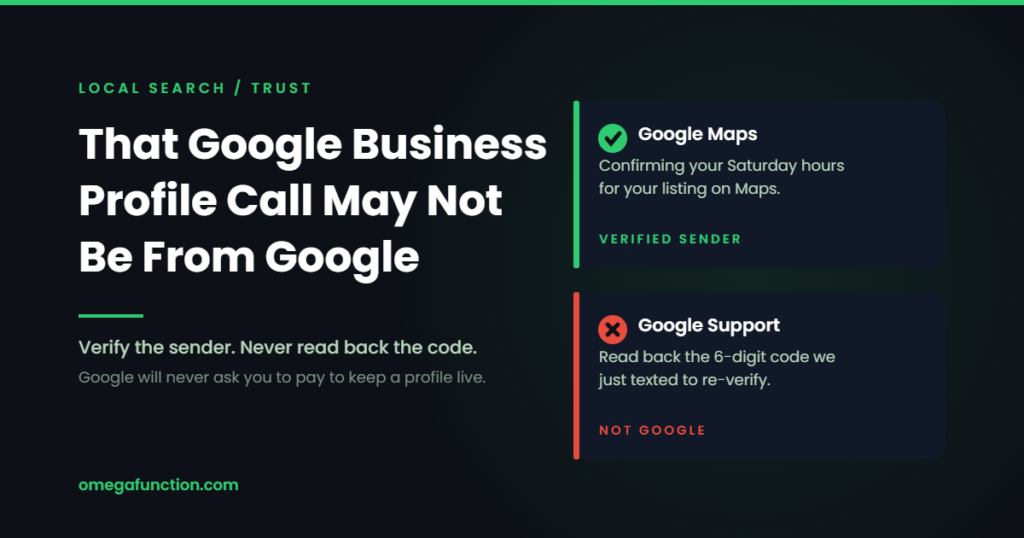
Google’s Business Profile help documentation tells owners how to spot fraudulent calls and texts. The useful part is not the warning. It is that Google publishes specific markers for verifying its own outreach: on WhatsApp, a blue verification checkmark and an account name of Google Maps. On RCS, a blue verification checkmark next to the sender name and a registered business name of Google. That gives you something checkable instead of a gut feeling. The broader lesson is that the phone call is the symptom. The exposure is who holds access to your profile and whether your own website can corroborate your business facts without it.
| The markers to check | WhatsApp: a blue verification checkmark and an account name of Google Maps, or Google Maps followed by a country name. RCS: a blue verification checkmark next to the sender name plus a registered business name of Google. Both markers, not one |
| Who gets targeted | Any business with a Google Business Profile. Service businesses that depend on Maps and local search see it most, because the threat of losing the listing lands hardest there |
| The single clearest tell | Google states it will never ask for a one time password, PIN, payment, credit card information, or an account password to keep a profile active. A Business Profile is free |
| Where the real risk sits | Not in the call. In stale access: former employees, former agencies, and unclaimed listings are how profiles actually get taken over |
| Do this week | Audit owners and managers, remove everyone who left, confirm you hold primary ownership, and make sure your website carries the business facts your profile does |
Nearly every local business owner we work with has taken this call. Someone claims to be from Google, or working with Google, and says the listing is about to be suspended, unverified, or removed from Maps unless something is confirmed right now. The pressure is the product. The caller wants either a payment or a verification code. Handing over the payment costs you money. Handing over the code can cost you control of the profile.
Google’s help documentation covers this directly, and the useful part is not the warning. It is that Google publishes concrete markers identifying a legitimate message from Google across the channels it actually uses. Those markers are what turn “be suspicious” into something you can check in the moment, which is the difference between a feeling and a process.
So let us turn it into one.
12
million attempts by bad actors to create fake Business Profiles, stopped by Google in 2021 alone
8
million attempts, nearly, to claim Business Profiles that did not belong to them, blocked in that same year
7
days before a newly added owner or manager can remove other users or transfer primary ownership, a built in window to catch a mistake
How Google actually contacts a business
Google does place automated calls and send messages to businesses. That is the part that makes the scam work: because real outreach exists, a fake one is plausible. Google’s documentation describes the legitimate version narrowly. It is about confirming business details such as operating hours or whether particular services are available, and it exists to keep Maps listings accurate.
Google’s own wording on what that outreach will never include: “Google will never ask for payment, credit card information, or account passwords.”
Google’s guidance gives per-channel identification markers. These are the details worth committing to memory, because they are verifiable in the moment rather than after the fact.
Automated phone call
The call states that it is from Google and why it is calling, for example to update your business hours. You will not be asked to sign up for a service, pay money, or give personal information.
WhatsApp message
The account carries a blue verification checkmark and the account name reads Google Maps, or Google Maps followed by a country name. No checkmark, no legitimacy.
RCS message
Two markers, and you want both: a blue verification checkmark next to the sender name, and a registered business name of Google. That verified sender identity is precisely why an unverified SMS asking the same question is a different animal.
Anything asking for money or a code
Not Google. Google states it will never ask for private or sensitive information, and never asks you to pay to maintain a Business Profile. There is no paid tier of a Business Profile to protect.
One caution worth stating plainly: a verified sender marker tells you the sender is who they claim, not that any particular request is safe. Treat it as one signal in a process, not as permission to hand over account details. The rule underneath all four boxes is the same, and it does not depend on the channel: if the request involves a code, a credential, or a payment, the answer is no regardless of how convincing the sender looks.
Caller Triage
Is That Really Google?
Seven messages a local business could plausibly receive this week. Make the call on each one before you read the verdict. Every answer is graded against Google’s published guidance, not against instinct.
Most owners get the obvious two right and misread the rest. The ones people miss are the legitimate messages, because blanket suspicion is not the same as a process.
Automated callA recorded voice says it is calling from Google Maps to confirm whether your holiday hours are still accurate, and asks you to press 1 to confirm or 2 to update.
Phone callA caller says your Business Profile will be removed from Maps in 24 hours unless you renew the listing today, and offers to take a card over the phone.
Phone callA caller identifying as Google support says they are re-verifying your listing and asks you to read back the six digit code Google just texted to your phone.
WhatsAppA WhatsApp message arrives from an account named Google Maps with a blue verification checkmark, asking whether your business currently offers delivery.
EmailAn email from a Google Partner agency says an audit found critical errors on your profile and offers to guarantee the top position in the Maps pack for a monthly fee.
RCS textA text arrives with a blue verification checkmark beside the sender name, where the registered business name shows as Google, asking you to confirm your Saturday hours.
Phone callA caller from the Google Business team says a security issue was detected and asks for the password on the account so they can secure the listing for you.
The call is the symptom. Access is the disease.
Here is the part that gets skipped. A business can answer every one of those seven correctly and still lose the profile, because a phone call is not the only route to a hijacked listing. Access that was granted years ago and never revoked is its own exposure, and it does not require anyone to pick up the phone.
Google's guidance on protecting a profile covers the structural side alongside the scam side. It warns specifically that unclaimed locations make a business more vulnerable and prone to hijacks, which is worth taking at face value: an unclaimed listing is simply available. It also covers access hygiene, and the language on owners is worth quoting because it explains why the roles are not interchangeable: owners "can edit and transfer ownership of your business, so add them with extra care."
Owner
Full control
- Adds and removes users
- Can remove the profile
- Can transfer primary ownership
- Everything a manager can do
- One primary owner only
Manager
Everything except the keys
- Edits business information and all URLs
- Posts, photos, products
- Replies to reviews and questions
- Manages Google Ads account links
- Cannot add or remove users, and cannot remove the profile
First 7 days
A built in grace period
- New users cannot delete the profile
- Cannot remove other users
- Cannot transfer primary ownership
- Use the window to confirm the invite went where you intended
That last line is the whole distinction. In Google's own summary, managers have mostly the same access as owners, and the only exception is that they cannot add or remove users or remove the profile. Everything else, including editing URLs and managing Google Ads account links, a manager can already do. Which means manager is the correct role for almost everyone who is not you. An agency does not need owner rights to do the work, and Google's own advice is to keep owner status yourself when a third party manages the profile. If a vendor tells you they require ownership, that is a negotiating position, not a technical requirement. We take manager access on client profiles for exactly this reason, and we say so in writing before the engagement starts.
A secure operating process for the profile
Scam awareness decays. Process does not. These are the seven rules we put in place on local engagements, and they hold whether or not anyone remembers what a legitimate WhatsApp sender name looks like.
Verify the sender before you respond, not while you respond
Check the marker for the channel: a stated Google identity and purpose on a call, a blue verification checkmark with a Google Maps account name on WhatsApp, a blue verification checkmark with a registered business name of Google on RCS. If the marker is absent, end the conversation and go to your profile directly.
Never release a verification code to anyone
No exceptions, including callers who correctly recite your address, hours, and category. Public profile data is public. Knowing it proves nothing. Google states it will never ask for a one time password or PIN.
Limit profile access to named individuals
No shared logins, no role inboxes that three people read. Every owner and manager should map to one person you can name. Google recommends email aliases for managers rather than personal accounts, so access survives staff turnover without being handed around.
Remove former employees and former agencies the day they leave
Put it on the offboarding checklist next to the door code and the email account. Removing a user does not erase their past replies to reviews or posts, so there is no content cost to revoking access promptly.
Document ownership and recovery information
Record which account holds primary ownership, which email receives verification, and who to contact internally. Store it where a second person can find it. Recovery is a fight you want to start with paperwork rather than with memory.
Treat unsolicited Google ranking calls as sales calls
Not as support, and not necessarily as fraud either. Evaluate them the way you would any vendor pitch: who are they, what is the contract, what is the exit. Google warns specifically about offers to help with your profile in exchange for money from people claiming to be Google.
Keep the business facts on your own website
Hours, address, phone, service area, and services should live on pages you control, marked up so machines can read them. If the profile is your only authoritative source, losing it removes your business from the record. If your site carries the same facts, the profile becomes a distribution channel rather than a single point of failure.
Why the website part matters more than it used to
Rule seven does more work than it looks like it does, and it is the one most local businesses have quietly inverted. Over the last several years the profile became the center of gravity for local presence, and the website drifted into being a brochure. That was tolerable when the profile was the main surface customers saw. It is a liability now, for two reasons that have nothing to do with fraud.
The first is recovery. A profile you cannot access is a profile you cannot correct, and while you work through reinstatement your hours and services are whatever the last person to edit them decided. If those facts are also published on your site with proper structured data, there is a canonical version to point at and to restore from.
The second is that the profile is no longer the only thing reading your business. Assistants and AI answer surfaces pull from the open web, and a site that states its own service area, hours, and offerings in machine readable form participates in those answers on its own terms. That is the practical argument for treating your site as the source of truth rather than a mirror, and it is the same argument behind generative engine optimization generally. Businesses whose entire local footprint depends on one platform account have concentrated a risk they could have distributed for free.
This is standard scope on our monthly SEO engagements, and it comes up on nearly every local audit we run across the Dallas Fort Worth area. It is especially acute for home service companies and med spas, where dispatch and booking depend on the phone number and hours being right, and for law firms, where a profile edited by someone outside the firm creates a compliance problem on top of a marketing one.
What we check first on a local engagement
When we take on a local client, the profile audit happens before any content or link work, because everything downstream depends on the listing being under control. In practice the same four findings turn up repeatedly.
Someone who no longer works at the company still holds manager access. A previous agency still holds owner access, sometimes primary ownership, occasionally without a documented way to reach them. The profile is verified to a personal email address belonging to someone who left. And the website does not state the hours or service area at all, so the profile is genuinely the only place that information exists.
None of those are exotic. All four are quiet until the day they are not. Fixing them takes an afternoon and removes much of what makes the phone call dangerous in the first place, which is why we do it first rather than treating it as housekeeping.
If you already gave something up
Move in this order. Change the password on the Google account tied to the profile and turn on two step verification, which Google names directly in its profile protection guidance. Open the profile and review the list of owners and managers, removing anything you do not recognize. Check that the business information, hours, phone number, and website URL still read correctly, since those are the fields an intruder changes first. Confirm you still hold primary ownership.
Then report it. Google's guidance points United States businesses to the Federal Trade Commission for fraudulent calls, and to forwarding scam texts to 7726, the shortcode carriers use to flag and block similar messages. Reporting will not recover an account, but it feeds the enforcement that produced those 20 million blocked attempts in a single year.
Frequently asked questions
Yes, which is what makes the impersonation viable. Google documents automated calls, texts, and WhatsApp messages sent to confirm business details such as operating hours or whether a service is available. The legitimate version identifies itself as Google, states its purpose, and asks only about the business detail in question. It does not ask you to sign up for anything, pay anything, or provide personal information.
No. A Business Profile is free, and Google states it will never try to convince you to pay to maintain one. There is no renewal, no premium listing tier, and no verification fee. Google has taken legal action against operators who charged businesses for the profile, describing the practice as exploiting entrepreneurs and small businesses in violation of its policies on deceptive content.
No. All of that is published on your profile and visible to anyone. Reciting public information is a rapport technique, not a credential. The verification markers Google publishes are the opposite of this: a blue verification checkmark with a Google Maps account name on WhatsApp, a blue verification checkmark with a registered business name of Google on RCS, and a stated Google identity and purpose on a call. Knowledge of your listing is not on the list.
You may have handed over the ability to claim or access the profile, since the code is what proves control. Treat it as an active incident: change the password on the associated Google account, enable two step verification, and review the owner and manager list for entries you do not recognize. Confirm you still hold primary ownership. Google states it will never ask for a one time password or PIN, so any request for one is disqualifying on its own.
Manager access is sufficient for the work. Managers can edit business information, publish posts and photos, and respond to reviews and questions. What they cannot do is add or remove users or delete the profile, which is precisely the separation you want. Google advises keeping owner status yourself when a third party manages your profile. If a vendor insists on ownership, ask what specific task requires it.
Google applies a seven day restriction to newly added owners and managers. During that window they cannot delete the profile, remove other users, or transfer primary ownership. It exists so that a mistaken or fraudulent invitation can be caught and reversed before it can be used to lock out the legitimate owners. Use the window: after adding anyone, confirm the invitation went to the address you intended.
It gives you a canonical version to restore from and a source customers and machines can still read while the profile is being corrected. It also reduces the concentration risk of having one platform account hold every fact about your business. Marking up hours, address, service area, and services with structured data on pages you control means your business remains legible to search and to AI answer surfaces independent of the profile's status.
If you open your profile's people and access list and find a name you cannot place, or you are not certain your site carries the business facts your listing does, send a message or a Loom walking through what you see and we will tell you what to remove and what to fix.
Sources
- Help protect against fraudulent calls and texts - Google Business Profile Help
- Help protect your Google Business Profile - Google Business Profile Help
- Add and remove owners and managers of your Business Profile - Google Business Profile Help
- About automated calls and texts from Google to confirm business info - Google Business Profile Help
- Protecting small businesses from scammers - Google, The Keyword, November 29, 2022
Platform documentation changes without notice, and Google does not publish a change log for these help pages, so nothing here should be read as a claim about when a particular piece of guidance was added. This article was reviewed on August 4, 2026 against the Google sources listed above, all of which are Google's own published material. Confirm the current wording of Google's Business Profile guidance before acting on it, and verify sender markers in the moment rather than relying on a description of them. See our editorial review policy for how we source and update this material.
Want this kind of insight applied to your stack?
Send a Message or Loom walking through your current setup and we'll come back with a scoped plan, not a sales pitch.
Get Started →