At a Glance
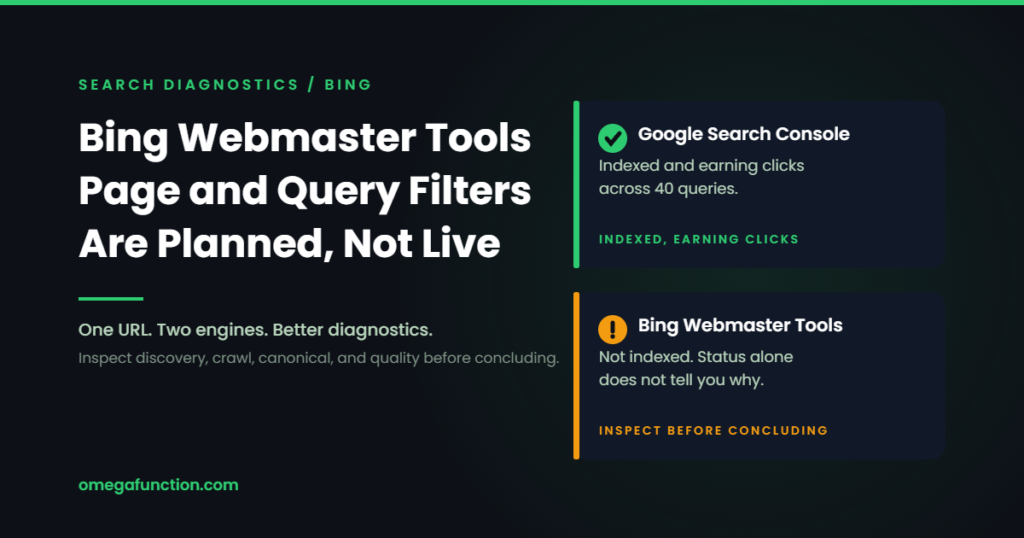
Microsoft has said it will work on page and query level filtering inside the Bing Webmaster Tools performance reports. That is a small feature request with an outsized effect, because the missing filter is the reason most teams export Bing data to a spreadsheet and then quietly stop looking at it. Nothing has shipped and no date was given, so the honest read is that this is a signal rather than a release. The useful move today is not to wait for the filter. It is to start running the Google and Bing reports side by side, because Bing now sits underneath a retrieval layer that feeds Copilot and a broader AI search ecosystem, and Search Console cannot see any of it.
| What happened | A Microsoft product manager on the Bing Webmaster Tools team publicly confirmed the team will work on page level filtering for queries and keywords in the performance reports |
| Status | Stated intent only. No release date, no preview, no documentation. Treat it as a roadmap signal, not a feature. Bing already filters by date, country, and device, and supports click through from a page to its keywords. What is absent is filtering the whole report to one page or query |
| Why it matters | Bing data is no longer only about Bing. Microsoft’s own reporting now covers citations in Copilot and AI generated answers, which is visibility Search Console does not measure |
| The workaround today | Export and pivot, or pull the data through the Bing Webmaster Tools API. Up to twenty four months of history is available, depending on when the property was first added |
| Do this week | Verify the site in Bing Webmaster Tools if it is not already, then compare the top query and page sets against Search Console and list the pages where the two engines disagree |
On July 31, 2026, a product manager on the Bing Webmaster Tools team responded to a public request for page level filtering on queries and keywords in the performance reports with a short answer: the team will work on it. That is the entire announcement. No date, no preview program, no documentation change.
Normally that would not be worth writing about. It is worth writing about here because of what the missing filter has been costing people, and because of what Bing data has quietly turned into over the past year.
What the report can and cannot do today
The Bing Webmaster Tools performance report is not thin. Microsoft rebuilt it in September 2023 to report clicks, impressions, and click through rate across web and chat combined, alongside Bing Images, Videos, News, and Knowledge Panel, plus indexing data covering URLs crawled, crawled with errors, and indexed. The history window has been extended twice since: to sixteen months in October 2024, which Microsoft framed as making it possible to identify long term trends and patterns that were previously hidden, and to twenty four months in August 2025, announced by the Bing Webmaster Tools team alongside country and device filters and keyword trendlines. In March 2025 the report gained period over period comparison for clicks, impressions, click through rate, keywords, and pages.
One wrinkle if you go checking Microsoft’s own documentation: the Search Performance help page has not kept pace. As of August 2026 it still describes analyzing performance data for up to the past six months, two expansions behind what the product actually holds. The twenty four month figure comes from the team’s public announcement rather than from the help documentation, which is a recurring theme in this article.
Microsoft has also been explicit that the data has boundaries. The 2023 announcement stated that keywords and URLs are reported only for the web, with expansion to other areas under consideration.
24
months of Search Performance history, extended from sixteen in August 2025 alongside country and device filters and keyword trendlines
5
reporting surfaces beyond the combined view: web and chat, Images, Videos, News, and Knowledge Panel
4
AI visibility dimensions added in preview on June 16, 2026: Intents, Topics, Citation Share, and Compare
It is worth being precise about what exists and what does not, because “better filters” can be read as though Bing has none. It has several. You can filter by date, and since August 2025 by country and device. The help documentation also describes click through drill down in both directions: click a page in the list and you get the keywords associated with it, click a keyword and you get the pages that were served for it, and from there position level detail for a keyword and page combination.
What is missing is filtering as a constraint on the report itself. There is currently no way to pin the Search Performance report to one URL or one query pattern and then read every metric, every chart, and every other dimension through that lens, the way Search Console lets you. Drill down shows you one list at a time. A filter reshapes the whole view. That distinction is what the July request was about, and it is the difference between looking something up and actually diagnosing it. For a single URL, the click through drill down already gives you the associated keyword list. Where the gap bites is repeatable analysis across many URLs, cross engine comparison, and any view of the report as a whole constrained to one page or query. That still means exports or the API. Most teams do it once, find it tedious, and never do it again. That is how a data source with twenty four months of history ends up unopened.
Bing data stopped being about Bing
Here is the part that changes the calculation. In February 2026 Microsoft put AI Performance into public preview in Bing Webmaster Tools, reporting how often a site’s content is cited across Microsoft Copilot, AI generated summaries in Bing, and select partner integrations. It surfaces total citations, average cited pages, the grounding queries the model used when retrieving the content, and citation activity for specific URLs.
In June 2026 that expanded with four dimensions. Intents classifies grounding queries into categories including informational, commercial, navigational, and research. Topics clusters related grounding queries, which Microsoft describes as helping publishers understand visibility in the same thematic structure that modern AI systems use to organize information. Citation Share gives the percentage of citations attributed to your site out of all citations shown for that grounding query. Compare overlays a prior period.
Microsoft is careful about what these numbers are not, and the caveats are worth repeating because they are easy to over-read. Grounding query data is a sample. Citation Share does not expose competitor domains, represent traffic share, or assign quality scores. Topics can be broad, particularly for specialized or niche domains. And Microsoft notes that citation patterns shift for reasons outside your control, including changes in user behavior, evolving models, freshness signals, and partner refresh cycles.
Even with all of that, it is a category of measurement Search Console does not offer. If a meaningful share of your audience is reaching answers through Copilot or an assistant grounded in Microsoft’s index, the only first party view of that visibility is inside Bing Webmaster Tools. Treating Search Console as the whole search market means running blind through a growing part of the search and discovery market. That is the practical case for building generative engine optimization into how you measure, not just how you write.
Two Engine Diagnostic
Where Google and Bing Disagree
Pick what a single URL is doing in each tool and the matching diagnosis is highlighted below. The disagreement between the two is the diagnostic signal, and it usually narrows the search to something specific and checkable. All nine combinations are written out, so you can read the whole grid without touching the controls.
Read this first. Index status does not reveal the cause by itself. Not indexed can mean the engine has not discovered the URL, could not crawl it, selected a different canonical, or crawled it and decided not to index it. Run URL Inspection in each tool before classifying anything below as a discovery, technical, duplication, or quality problem.
Showing all nine combinations.
Google: indexed, earning clicks / Bing: indexed, earning clicks
Baseline
Both engines agree the page works
Google and Bing both index the URL and both send clicks. There is no crawl, render, or eligibility problem to chase here, and the two engines are reading the page the same way.
Next: use this page as your control. When another URL misbehaves, diff it against this one for template, internal links, and markup before assuming an engine specific bug.
Google: indexed, earning clicks / Bing: indexed, few clicks
Bing gap
Google earns clicks, Bing does not
The page is indexed in both, so discovery is not the question. The gap is in what each engine matches the page to and where it ranks it. Compare the associated query sets, average positions, titles, headings, internal links, competition, and audience demand across the two before assuming anything about either engine’s preferences.
Next: pull the Bing keyword list for the URL and compare it to the Search Console query set. If Bing is matching the page to a different intent, the title and H1 are usually where that divergence starts.
Google: indexed, earning clicks / Bing: not indexed
Bing not indexed
Google indexes it, Bing does not
Bing may not have discovered or successfully crawled the URL. It may equally have crawled it and excluded it over canonicalization, duplication, perceived value, or another indexing decision. On the discovery side the usual causes are absence from a sitemap Bing has fetched, crawl blocking that only affects bingbot, or a page reachable only through JavaScript navigation. Check Bing URL Inspection before picking the fix.
Next: run the URL through Bing URL Inspection, confirm bingbot is allowed in robots.txt, and submit it. Adopting IndexNow reduces the discovery lag behind most of this class of problem.
Google: indexed, few clicks / Bing: indexed, earning clicks
Google gap
Bing earns clicks, Google does not
Bing finding value that Google does not usually means the content genuinely answers something. The Google side is more often a competitive or authority problem than a technical one, since the page is indexed and impressions exist.
Next: check the Search Console query set for a mismatch between the queries the page earns impressions on and the query it was written for. Then look at whether stronger internal links point at it.
Google: indexed, few clicks / Bing: indexed, few clicks
Demand or intent
Indexed in both, earning clicks in neither
When both engines index the page and neither sends clicks, the problem is rarely the engines. Either the queries it ranks for have little demand, or it ranks in positions nobody clicks, or the title and description are not earning the click at the position it holds.
Next: check average position in both tools before touching the page. Rewriting a title that sits in position 30 changes nothing. Fix position first, then click through rate.
Google: indexed, few clicks / Bing: not indexed
Split discovery
Google indexes it with few clicks, Bing does not index it
Two separate problems stacked. Bing is not indexing the URL, which could be discovery, crawl, canonical, or an indexing decision, and Google is indexing it without earning clicks. Resolve them separately rather than looking for one shared cause.
Next: inspect the URL in Bing to find out which of those it actually is, then treat the Google side as a content and intent question rather than a technical one.
Google: not indexed / Bing: indexed, earning clicks
Reverse gap
Bing indexes it, Google does not
Uncommon and worth taking seriously. Bing having processed the URL narrows the field, though it does not rule out a Google specific crawl or rendering issue, since the two crawlers can differ on rendering, firewall treatment, and prioritization. Quality, duplication, and canonical signals are the usual suspects.
Next: check the Search Console Page Indexing report for the exact exclusion reason. Crawled but not indexed and Duplicate without user selected canonical are the two we hit most often in audits, and they need different fixes.
Google: not indexed / Bing: indexed, few clicks
Reverse gap
Bing indexes it weakly, Google not at all
Bing accepted the URL but barely surfaces it, and Google has not indexed it. Bing having processed the page narrows the field, but Google’s reason still has to be read rather than guessed: duplication, canonical selection, perceived value, and crawl or rendering differences are all live possibilities.
Next: read the Search Console exclusion reason first, then ask whether this URL should exist as its own page at all. Consolidation often beats optimization here.
Google: not indexed / Bing: not indexed
Not indexed anywhere
Neither engine has indexed the page
A shared technical problem is the first thing to rule out: robots.txt, the noindex tag, canonical targets pointing elsewhere, sitemap inclusion, and whether the page is reachable through crawlable links rather than script driven navigation. It can equally reflect duplication, canonical selection, soft 404 classification, insufficient value, or two independent engine decisions that happen to land the same way.
Next: inspect the URL in both tools and read each engine’s stated reason before changing anything. Agreement between two engines is a strong signal that something is wrong, but it is not by itself a diagnosis.
What to actually compare between the two
Running two tools is only useful if you know what the comparison is supposed to tell you. Five comparisons carry most of the value.
Query visibility, engine against engine
Pull the top query sets from both and look at what appears in one and not the other. Then run the separate comparison that matters now: Search Performance queries against AI Performance grounding queries, to see whether the same themes show up in traditional search and in AI generated answers. Those are two different datasets, so treat them as two different reads rather than assuming a Bing only organic query was the one an assistant grounded on.
Pages each engine understands differently
If the two engines consistently associate a page with substantially different topics, inspect the title, headings, internal anchor text, entities, and supporting content for ambiguity. Treat it as a diagnostic lead, not a conclusion. Divergence can also come from differing ranking systems, user populations, localization, competition, indexing history, or a page that legitimately serves more than one intent.
Discovery gaps in both directions
Check whether Bing has found and indexed URLs Google has skipped, and the reverse. Each direction points at a different cause, and the grid above walks through which is which.
Branded, commercial, and informational queries tracked apart
Aggregate click totals hide almost everything. Branded demand moves for reasons unrelated to your SEO work, and letting it sit in the same number as commercial queries makes both unreadable. Microsoft's Intents dimension classifies grounding queries along similar lines, which makes the split easier to maintain on the Bing side.
Citation visibility, which has no Google equivalent
Total citations, cited pages, and Citation Share are only available on the Microsoft side. Watch the direction of travel rather than the absolute numbers, since Microsoft states the grounding query data is a sample and citation patterns shift for reasons outside your control.
What to do until the filter ships
Nothing about this needs to wait. The export path is tedious but it works, and for a property you verified a while ago the twenty four month window means the history is already sitting there. For any site large enough that the export is genuinely painful, the Bing Webmaster Tools API gives programmatic access to page, query, and page and query traffic statistics, which is the more durable answer regardless of what the interface eventually offers. Worth knowing before you build against it: the methods are scoped one at a time to a site, a query, or a page, so bulk page level collection means looping your URLs rather than making one call, and parts of the API documentation are old enough that you should verify freshness against what you actually get back.
The Pivot, Concretely
Rebuilding the missing filter in four steps
Roughly ten minutes the first time. Bing already gives you the page to keyword relationship one URL at a time. What this rebuilds is the repeatable, cross engine version of it.
- Start from the URL, not the export. Open the Pages table in Search Performance and click the URL. Bing shows you the keywords associated with that page, which is the relationship you need. The aggregate Pages and Keywords exports do not carry it: a list of pages and a separate list of keywords cannot tell you which keyword belongs to which page.
- Export that drill down. One URL at a time through the interface. For more than a handful, go to the API instead: GetPageQueryStats returns the queries for a given page, and GetQueryPageStats returns the pages for a given query.
- Pull the same URL from Search Console. Apply an exact page filter, match the date range, and export the Queries table. Normalize both URL columns, since protocol and trailing slash mismatches break more joins than anything clever does.
- Compare the two query sets. Mark shared, Bing only, and Google only. Compare each query against the others within the same engine rather than reading raw Bing and Google click totals as equivalent numbers, because the traffic bases are not comparable.
What you are building toward looks like this:
| URL | Query | Bing clicks | GSC clicks | Read |
| /services/audit/ | technical seo audit | 31 | 240 | Agreement |
| /services/audit/ | crawl budget checker | 18 | 0 | Bing only, investigate |
| /services/audit/ | site audit pricing | 0 | 96 | Google only, investigate |
Illustrative structure, not real client data. The last column is the whole point: the rows that disagree are the ones worth an hour of your time.
If you are already warehousing Search Console data, adding Bing to the same destination is a small increment and removes the manual step entirely. That pattern is exactly what we build in BigQuery for clients who need query level analysis across more than one engine, and it is why we treat Search Console as one input to a diagnostic rather than the diagnostic itself.
Microsoft also publishes its own comparison of the two tools, and it highlights capabilities Search Console genuinely does not have: IndexNow for proactively notifying search engines about added, updated, or deleted URLs, Site Explorer with advanced filtering for granular analysis, and backlink data for sites other than your own. IndexNow in particular is worth adopting on its own merits, since it can reduce discovery lag by proactively notifying participating search engines when URLs are added, updated, or removed. It does not guarantee crawling, indexing, or visibility, and Microsoft is clear that submission is not a promise of inclusion. What it does is remove the waiting from the part of the process you control.
What we check first
On a technical audit the Bing side takes about twenty minutes and it consistently turns up things Search Console cannot show. The most common finding is not dramatic: the property was never verified in Bing Webmaster Tools at all. That is worse than it sounds, because Microsoft states that data collection begins when you first add the site and that you cannot see backdated data, so the window starts from setup rather than reaching backwards. Expect a few days before the report populates at all. The second most common is a set of URLs Bing indexed that Google excluded, which is a fast way to find canonical and duplication problems that would otherwise take a crawl to surface.
After that, the comparison work is genuinely diagnostic rather than reporting. Two engines reading the same page differently is information about the page, and it is the kind of signal that shapes internal link and site architecture decisions on our monthly engagements. Agencies we support through white label work increasingly ask for the Bing and Copilot view specifically, because their clients have started asking where they show up in AI answers and Search Console has no answer to give.
Frequently asked questions
No. A product manager on the Bing Webmaster Tools team publicly confirmed on July 31, 2026 that the team will work on it, in response to a request for page level filtering on queries and keywords. There is no release date, no preview program, and no documentation describing the feature. Treat it as a statement of intent. Anything you need to diagnose before it arrives still has to go through export or the API.
The traffic argument is the weaker one now. The stronger argument is that Microsoft's AI Performance reporting shows how often your content is cited across Copilot, AI generated summaries in Bing, and select partner integrations, which is visibility no Google tool reports. There is also a timing reason to verify early even if you do nothing else with it. Microsoft's Search Performance documentation states that because data collection starts from the time you first add your website in Bing Webmaster Tools, you cannot see backdated data. The window is up to twenty four months beginning when the site was first added, not twenty four months of history waiting for you.
Twenty four months, for a verified property. The window went from six months to sixteen in October 2024, then to twenty four in August 2025 alongside country and device filters and keyword trendlines. Two full years is long enough for genuine year over year comparison, which is the main thing the original six month window made impossible. Note that the Search Performance help page still describes a six month window as of August 2026, so the documentation understates what the product holds.
Yes for search performance. Microsoft added period over period comparison for clicks, impressions, click through rate, keywords, and pages in March 2025, along with changes to the time filters. On the AI Performance side, the Compare dimension added in June 2026 lets you overlay the current thirty day period against the prior thirty days or a custom range. Comparison and filtering are separate capabilities, and it is the filtering that is still missing.
The percentage of citations attributed to your site out of all citations shown across all sites for that same grounding query. Microsoft is explicit about the limits: it does not expose competitor domains, does not represent traffic share, and does not assign quality scores. It is a relative visibility indicator for a specific grounding query, and it should be read as a trend rather than as a scoreboard.
Because the two engines apply different thresholds to the same page. Bing indexing the URL confirms that at least one major search engine discovered and processed it, which narrows the investigation without closing it: bingbot and Googlebot can still differ on rendering, firewall treatment, crawl prioritization, and canonicalization, so a Google specific crawl or rendering problem is not ruled out. Start with the Search Console Page Indexing report, which names the exclusion reason. In our audits the two we encounter most often are Crawled but not indexed and Duplicate without user selected canonical. They call for different fixes, so read the reason before acting.
It should change what you investigate more than what you publish. If the engines consistently associate a page with substantially different topics, investigate possible ambiguity in its title, headings, entities, internal anchor text, and supporting content. Treat the difference as a lead rather than proof, since ranking systems, competition, localization, and audience differences can also produce divergent query sets. Grounding queries are more directly useful as input, since they show the phrasing a model used when it retrieved your content, but Microsoft notes that data is a sample, so treat it as directional rather than as a keyword list.
If you want a read on where the two engines disagree across your site, and what that disagreement is actually telling you, send a message or a Loom with the URL and we will take a look.
Technical review
Reviewed by the Omega Function technical team, a small expert group with 20 years of combined experience in technical SEO, indexation diagnostics, analytics implementation, and cross engine reporting. Claims about what Bing Webmaster Tools does today were checked against Microsoft's own documentation and interface on the date shown. Where the documentation and the product disagree, we say so in the text rather than picking the more convenient one.
Sources
- Unlocking insights with the new Bing Webmaster Tools Performance Report - Bing Webmaster Blog, September 2023
- Bing Webmaster Tools Extends Search Performance Data to 16 Months - Bing Webmaster Blog, October 2024
- Bing Webmaster Tools or Google Search Console: A Comparison - Bing Webmaster Blog, August 2024
- Supercharge Your Search Performance with Bing Webmaster Tools - Bing Webmaster Blog, March 2025
- Introducing AI Performance in Bing Webmaster Tools Public Preview - Bing Webmaster Blog, February 2026
- New AI Visibility Insights in Bing Webmaster Tools: Intents, Topics, Citation Share, Compare - Bing Blogs, June 16, 2026
- Search Performance - Bing Webmaster Tools help documentation, checked August 2026. Source for the click through drill down behaviour and for the statement that data collection starts when a site is added and backdated data is not available
- Bing Webmaster API - Microsoft Learn, for the page, query, and page and query traffic statistics methods
- Bing Webmaster Tools now with 24 months of data, filters by country and device, and keyword trendlines - Search Engine Land, reporting the Bing Webmaster Tools team announcement of August 2025. Microsoft did not publish a Bing blog post for this change
- Bing Webmaster Tools To Gain Page and Query Level Filtering - Search Engine Roundtable, reporting the Microsoft product manager exchange on X, July 31, 2026
Product roadmaps change and stated intent is not a shipped feature. This article was reviewed on August 5, 2026 against Microsoft's own published material for everything describing what Bing Webmaster Tools does today. Note that Microsoft's own Search Performance help page still described a six month window when we checked it, so the documentation and the product disagree, and we have flagged which claims rest on which. The filtering announcement itself has no Microsoft documentation behind it and rests on a public exchange reported by a third party, which is why it is framed here as a signal rather than a release. Confirm current capabilities in the tool before planning around them. See our editorial review policy for how we source and update this material.
Want this kind of insight applied to your stack?
Send a Message or Loom walking through your current setup and we'll come back with a scoped plan, not a sales pitch.
Get Started →