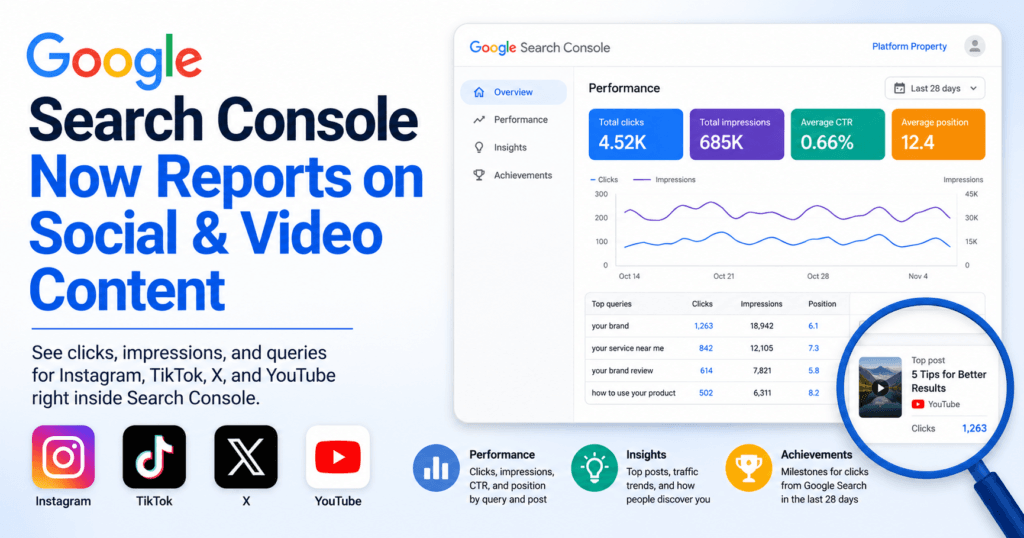
Search Console just started reporting on content it never used to see. Google’s new platform properties let you connect an Instagram, TikTok, X, or YouTube account and get Search Console style reporting, clicks, impressions, and the actual queries, for content that lives entirely off your own domain. Until now, a business could see exactly how its website performed in Google Search but had almost no visibility into how a client testimonial reel, an X thread answering a common question, or a YouTube walkthrough was showing up in those same results. That gap is closing, and it changes what “Google visibility” means for a brand.
At a Glance
3
report types inside every platform property: Performance, Insights, and Achievements
The rollout is gradual, and a new property shows no data for the first few days while Google collects it. Once it does, the reporting works the same way site owners already know from a standard property: filter by query, sort by clicks, and find the specific post that is actually earning the impressions.
What Actually Changed
Platform properties are a new property type inside Search Console, sitting alongside the domain and URL prefix properties most site owners already have. Instead of verifying a website, you verify an Instagram, TikTok, X, or YouTube account, and Search Console starts reporting on how that account’s individual posts and videos perform across Google Search, Google Discover, and Google News.
That distinction matters. Before this, a marketing team could see that a video or post was getting shares and comments on the platform itself, but had no clean way to tell whether any of that traffic originated from someone searching Google. If an Instagram post kept showing up for a branded query, that signal used to be invisible outside the platform’s own analytics. Now it is separated out and reported the same way a page on your website would be.
What Platform Properties Show You (and What They Don’t)
Platform properties only show how content performs on Google’s own surfaces. They do not include native platform metrics like TikTok video views, Instagram saves, or X reposts, and there is no minimum follower or subscriber count required to connect an account. Each property also covers a single account, so a business or agency tracking several profiles needs to verify each one separately.
The Real Opportunity: Five Ways to Use This Data
The announcement itself is the easy part to cover. The more useful question is what a business actually does with this reporting once it is live. A few ways to put it to work:
1. Find the social posts already ranking for your branded and service queries
Open the Performance report for a connected platform property and filter by query. Look specifically for your brand name and your core service terms. It is common to find a video or post quietly ranking for a query the website itself has never fully targeted, which is a direct signal for where to focus next.
2. Compare website visibility to platform visibility, side by side
Run the same date range and the same query filters against your existing domain property and your new platform property. The split usually tells a story: informational queries tend to favor the website, while branded and local intent queries pull more heavily from a social profile or a YouTube channel page. Seeing both properties next to each other is the first time most businesses can measure that split with real numbers instead of a guess.
3. Identify content topics worth expanding into service pages
When a social post earns clicks for a query that sounds like buying intent, that is a topic the website is probably under-serving. Treat it as a content brief: build or expand a dedicated service page around it rather than leaving that visibility to live entirely on a platform you do not control. This is the same gap analysis behind a monthly SEO program, just with a new data source feeding it.
4. Track whether social visibility produces branded search or assisted conversions
A spike in platform property clicks is not the end goal, it is a leading indicator. Watch GA4 for a corresponding lift in branded search traffic or assisted conversions in the days after a post gains traction. If the lift never shows up, the post is earning impressions without moving the business forward, which is worth knowing either way.
5. Repurpose strong posts into owned website assets
A high performing reel, thread, or video is proof a topic works with real searchers. Convert it into an FAQ entry, a page section, or a blog post that lives permanently on your own domain. Platform reporting can change or disappear if an account is suspended, an algorithm shifts, or a platform deprecates a feature. A page you own does not carry that risk.
Social Visibility Action Plan
How much of this data are you actually using?
Check off what your team has already done with platform property data.
How to Connect a Platform Property
- In Search Console, choose Add Property and select a platform (Instagram, TikTok, X, or YouTube) instead of a domain or URL prefix.
- Follow that platform's verification prompts. This confirms account ownership, not ownership of a website.
- Expect no data for the first few days. A new property starts empty while Google collects reporting.
- Repeat separately for every account. A property covers one account at a time, so a business or agency tracking multiple profiles needs one property per account.
- Recheck the connection periodically. Ownership is verified on an ongoing basis, and a lapsed connection needs to be reconnected.
Your First 90 Days With This Data
Days 1-30
Connect and Observe
- Verify every active platform account
- Let reporting accumulate without changing anything
- Pull the first Performance report by query
Days 31-60
Compare and Flag
- Compare website and platform visibility for shared queries
- Flag content topics missing from service pages
- Draft or expand one page around the strongest gap
Days 61-90
Track and Repurpose
- Check GA4 for branded search or assisted conversion lift
- Repurpose the best performing post into an owned asset
- Revisit the scorecard above and reassess
Platform properties are one more piece of a visibility picture that used to live in separate tools: a website's own Search Console data, GA4 conversions, and now Google's read on off-site social and video content. Pulling those into one place is exactly the kind of reporting problem a shared dashboard is built to solve, and it is also part of the broader shift toward visibility across every surface Google uses to answer a query, not just the ten blue links, which is the same thinking behind generative engine optimization.
This is a new reporting surface, not a new algorithm. It will not change how content ranks. What it changes is whether a business can actually see the value its social and video content is already producing in Google Search, and whether that value gets reinvested into pages the business owns outright.
Want Help Turning This Into a Plan
If platform property data raises more questions than it answers, that's normal for a first look. Send a Message or Loom and we'll help you read it.
Want this kind of insight applied to your stack?
Send a Message or Loom walking through your current setup and we'll come back with a scoped plan, not a sales pitch.
Get Started →